
Як би це було так то ніхто б не відповів) а так купу ображених забайтив. Ще й ти ось потужився і написав пост без сенсу. Харош харошbes: ↑ 15.12.2024 18:58 чувак ты в каком то своем мире живешь, всем плевать на нее
Новости
Последние статьи и обзоры
Огляд та тестування ігрового 27” WQHD-монітору MSI MAG 275QF з частотою оновлення 180 Гц
-
Usagi
Member
- Откуда: Дніпро
-
bes
Member
- Откуда: Kryvyi Rih
так а как это сочетается с тем что твое мнение весомей и объективней ?Usagi: ↑ 15.12.2024 20:38а так купу ображених забайтив.bes: ↑ 15.12.2024 18:58 чувак ты в каком то своем мире живешь, всем плевать на нее

 Ты что то пишешь обо всем и не о чем, если для мамы то может быть. Если для форумчан то что то ты сильно накручиваешь себя.
-
Usagi
Member
- Откуда: Дніпро
Так дуже просто, якщо людей трігерить настільки, що вони пишуть такі гнєвні пости як той де він намагався виставити мою думку не важливою, то це означає що в нього є з цього приводу якась травма.bes: ↑ 15.12.2024 20:54 так а как это сочетается с тем что твое мнение весомей и объективней?
Я не хочу тобі зараз писати величезну купу тексту оскільки ти або погодишся або ні. І якщо погодишся то ти і так розумієш що я правий.
Всі хто тикнули мінус на моїх критеріях або ж написали осудливий\гнєвний пост під цим - просто не змогли змиритися з реальністю що хтось вважає їхній бюджетний монітор поганим вибором. Якщо ти не помітив, то я тут з адекватними форумчанами досить розгорнуто і технічно спілкувався по темі.
Якщо сюди зайшли клоуни помінусити без обгрунтованої думки то я ж зовсім не проти, мені забавно таке читати
-
man1242
Member

- Откуда: Кривий Ріг
2к 32 длсс на пересете перфоманс плохо выглядитUsagi: ↑ 13.12.2024 15:37Пункт 1 випливає із пункту 4. 32" 2к це чудовий варіант. Але 16:9 це все ж коробка яка не дає поставити нормальний фов в іграх(бо разраби як завжди клоуни).l-m: ↑ 13.12.2024 15:22
Найкращі монітори наразі це ОЛЕД 4к 32", які не підходять під пункти 1 та 4 (хоча реальна площа у них більше та висота нормальна, а не як у 27")
Не мінусував, антифанат продукції комуністів, маю 4к 32", але нажаль ІПС, хоча й значно вищої якості ніж тут в огляді.
Я написав гіпотетичні пункти без сильного урахування ціни і доступності.
Якщо балакати про топ за свої гроші то я б сказав стартер це 2к 32 олед 120 або мінілед з локальними зонами (від 2к) 240гц
Відправлено через 9 хвилин 5 секунд:Ідеальний ппі якщо сидіти достатньо близько.l-m: ↑ 13.12.2024 15:22 Не мінусував, антифанат продукції комуністів, маю 4к 32", але нажаль ІПС, хоча й значно вищої якості ніж тут в огляді.
В мене зараз 32:9 49" але я б перейшов на 21:9 50"+
Але доки такий варіант зʼявиться ще й по адекватній ціні… швидше ВР зпрогресує до моменту заміни монітору. Залишилось десь х2 підняти роздільну здатність (до 4000х4000 на око) і можна переходити
-
ALT-F13
Member
- Откуда: Київщина
У вас схоже всі жарти невдалі, судя з сусідніх тем. Не варто продовжувати.Alligator: ↑ 13.12.2024 22:11Вибачаюсь, давно монітори не купував, а що зараз бюджетні моніторі в пупирці обмотані скотчем зазвичай присилають?
По сабжу: більш дорогі моделі геймерських серій (а МАG є такою, тільки молодшою) часто отримують вже повнокольоровий друк на коробці.
Як правильно кажуть тут, це все дуже суб'єктивно - є люди, яким більше 27" незручно, наприклад.Kassatka: ↑ 14.12.2024 03:51Я б написав так
Є дві речі, які поважаючий себе геймер не має дозволяти собі у 2024 році щодо характеристик монітора:
1) менше за 43"
2) менше за 4K 3840x2160.
Скажу про себе: як раз перейшов в якості основного монітору з 43" 16:9 4К на 40" 21:9 1440p і щасливий. Назад на 16:9 тепер зовсім не хочу. І до конфігурації 3х27" в ряд ще раз теж не хочу. Всяка дрібна хрінь на бокових вертикальних 21" моніторах виводиться, зараз ще поверну на місце по центру зверху 25", але саме для ігрових потреб 21:9 більше сподобалося.
Підкреслю, правда, що мова про 40". 34" видаються малими.
Втім, прикольно що це все обговорюється в темі про швидкий бюджетний 27"
-
Alligator
Member

- Откуда: Миколаїв
Ну без жартів записувати "кольоровість" коробки монітору у плюси чи мінуси - це смішно. Навіть інтел з додекаедром для Core i9-9900K більше так не робить.ALT-F13: ↑ 16.12.2024 11:35У вас схоже всі жарти невдалі, судя з сусідніх тем. Не варто продовжувати.
По сабжу: більш дорогі моделі геймерських серій (а МАG є такою, тільки молодшою) часто отримують вже повнокольоровий друк на коробці.
-
Polybius
Member
Та це ж наче просто опис пакування, чого ви вирішили, що це якийсь плюс чи мінус.Alligator: ↑ 16.12.2024 11:57Ну без жартів записувати "кольоровість" коробки монітору у плюси чи мінуси - це смішно
 воно завжди у оглядах будь-яких продуктів є, на материнках чи відяшках теж завжди пишуть, на кшталт коробка поліграфія, написано те й те на них
-
ALT-F13
Member
- Откуда: Київщина
1) це ви розкажіть тим, хто займається розстановкою товарів в рітейліAlligator: ↑ 16.12.2024 11:57Ну без жартів записувати "кольоровість" коробки монітору у плюси чи мінуси - це смішно. Навіть інтел з додекаедром для Core i9-9900K більше так не робить.
2) анбоксинг є настільки частиною "користувацького досвіду", що відповідні відео феноменально популярні, хоча як на мене - не несуть важливої інформації
3) ну все ж таки в плюси-мінуси воно й не записано, просто згадано у відповідному розділі статті як факт
Якось так
-
Nijino Yume
Junior
Hi,
Your calibration & verification procedure has several flaws:
-Pre calibration
You should verify against driver's ICM or EDID data ICM: "does this display behaves out of the box as manufactures said?"
Or against each factoy preset, for example sRGB: change mode to OSD, then on DisplayCAL verify using : simulate profile sRGB & use simulation profile as display profile.
You did a profile, supposedly without calibration, which is partially OK (but worse than suggested way of verificating a pre calibration), but chose a 3xTRC profile as we can see in nominal values. This is a taylor made suit, this way you hide severe color cast on greys, unless your readers know how to read those numbers:
https://www.overclockers.ua/content/rev ... -275qf.png
-Post calibration:
Same as above. You should choose as target profile a single curve + matrix profile type. When you verify this profile all color tint in greyscale after calibration could be spotted easily.
Using what you did (non zero nominal values) hides them: https://www.overclockers.ua/content/rev ... -275qf.png
In the same way it is prefered a matrix profile than a XYZLUT profile becaus these way, after calibration, with greyscale corrected by profile, all volumetric color errors will show. Any "non additive behavior" of RGB primarues will show up.
Using a XYZLUT, a "3d mesh taylor made suit", you hide them.
-Colorimeter correction
Before pre and post calibratiom report you should have included a line about what colorimeter correction you chose. It can be an educated guess, for example: "since this display is a QD-OLED but there is no official EDR/CCSS fro these and we have not found any sample con DisplayCAL colorimeter database (CCSS) we are using the default RGB OLED" and it is OK to do that. Same for QLED (default Q9 TV's on DisplayCAL correction bundle for i1d3) or the 3 families of W-LED PFS phosphor for widegamut LED backlit displays.
-Uniformity report
You should not use the default dE error report. dE as an scalar pseudodistance is a 3d distance pseudometric: it includes the brightness error and the color tint error in the same way an hypotenuse contains "agregated info" of the two sides of a square triangle into a single number.
We assume that most displays will have -10/-15% brightness drop on corners (OK), but consumers want almost cero color tint errors (deltaC).
On HTML uniformity report you should have chosen the center combo box "Average luminance & delta C", not ISO (deltaE)
This way your readers will know if there are severe color tints on the screen (deltaC > 2 or 3) and at the same time evaluate brightness uneveness.
With your dE report they cannot know if overall dE error is caused by brightness or by color tint.
This is constructive criticism to help you improve your reviews.
I do not speak ukranian (sorry) but I saw 1888.tech post on instagram about this display and decided to take a look on the review.
Your calibration & verification procedure has several flaws:
-Pre calibration
You should verify against driver's ICM or EDID data ICM: "does this display behaves out of the box as manufactures said?"
Or against each factoy preset, for example sRGB: change mode to OSD, then on DisplayCAL verify using : simulate profile sRGB & use simulation profile as display profile.
You did a profile, supposedly without calibration, which is partially OK (but worse than suggested way of verificating a pre calibration), but chose a 3xTRC profile as we can see in nominal values. This is a taylor made suit, this way you hide severe color cast on greys, unless your readers know how to read those numbers:
https://www.overclockers.ua/content/rev ... -275qf.png
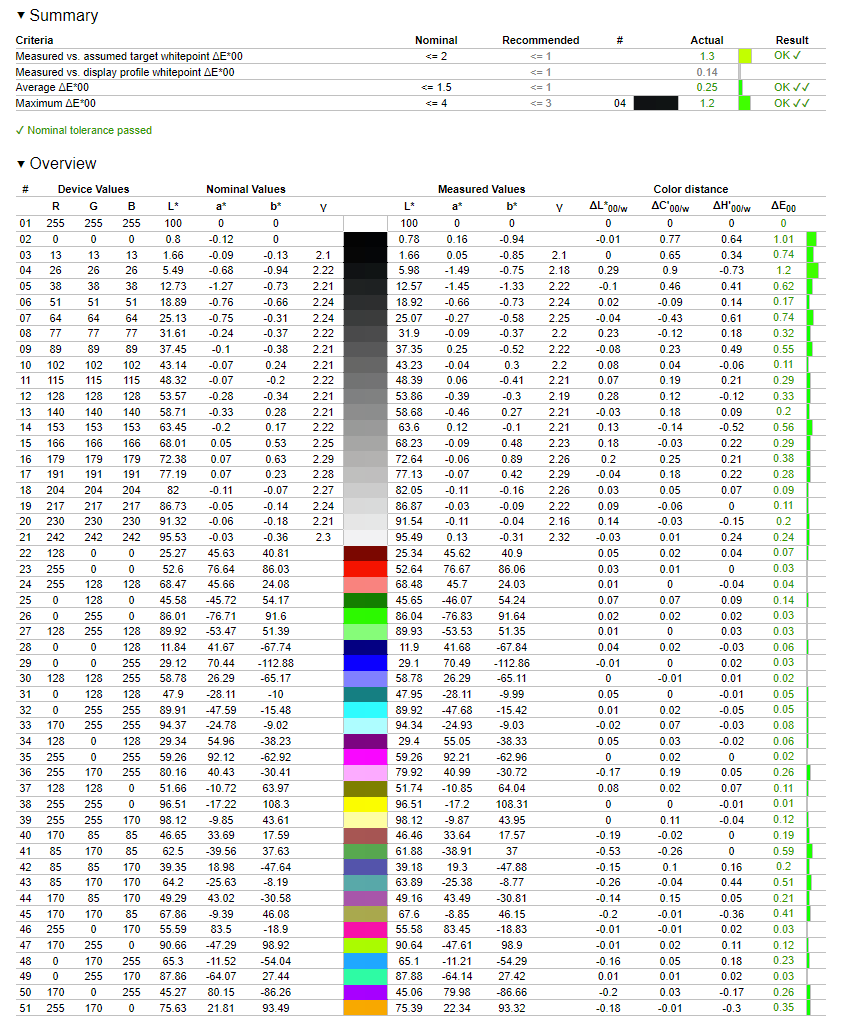
-Post calibration:
Same as above. You should choose as target profile a single curve + matrix profile type. When you verify this profile all color tint in greyscale after calibration could be spotted easily.
Using what you did (non zero nominal values) hides them: https://www.overclockers.ua/content/rev ... -275qf.png
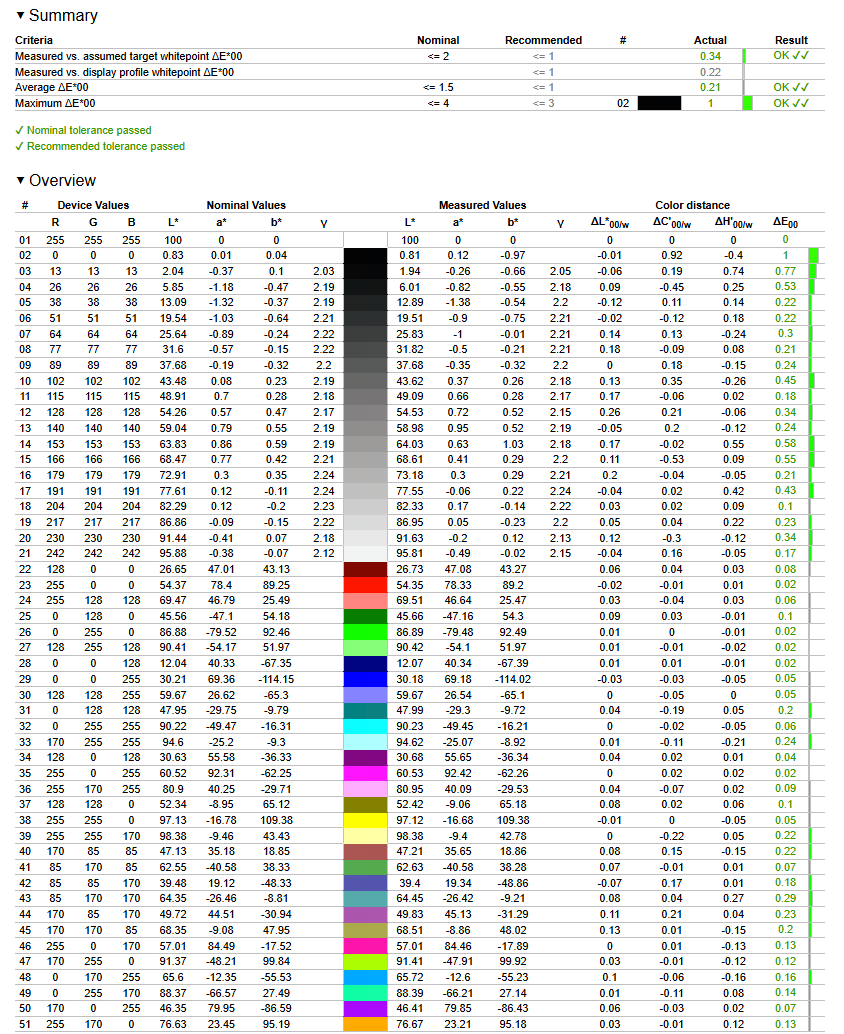
In the same way it is prefered a matrix profile than a XYZLUT profile becaus these way, after calibration, with greyscale corrected by profile, all volumetric color errors will show. Any "non additive behavior" of RGB primarues will show up.
Using a XYZLUT, a "3d mesh taylor made suit", you hide them.
-Colorimeter correction
Before pre and post calibratiom report you should have included a line about what colorimeter correction you chose. It can be an educated guess, for example: "since this display is a QD-OLED but there is no official EDR/CCSS fro these and we have not found any sample con DisplayCAL colorimeter database (CCSS) we are using the default RGB OLED" and it is OK to do that. Same for QLED (default Q9 TV's on DisplayCAL correction bundle for i1d3) or the 3 families of W-LED PFS phosphor for widegamut LED backlit displays.
-Uniformity report
You should not use the default dE error report. dE as an scalar pseudodistance is a 3d distance pseudometric: it includes the brightness error and the color tint error in the same way an hypotenuse contains "agregated info" of the two sides of a square triangle into a single number.
We assume that most displays will have -10/-15% brightness drop on corners (OK), but consumers want almost cero color tint errors (deltaC).
On HTML uniformity report you should have chosen the center combo box "Average luminance & delta C", not ISO (deltaE)
This way your readers will know if there are severe color tints on the screen (deltaC > 2 or 3) and at the same time evaluate brightness uneveness.
With your dE report they cannot know if overall dE error is caused by brightness or by color tint.
This is constructive criticism to help you improve your reviews.
I do not speak ukranian (sorry) but I saw 1888.tech post on instagram about this display and decided to take a look on the review.