
В этой теме выбираем звуковые карты
Пофилософствовать на тему звука можно там
Флуд наказуем и преследуется по всей строгости правил
Новости
Последние статьи и обзоры
Выбор звуковой карты
-
vdemeshko
Member

- Откуда: Киев
да вроде можно все - в винде выбратьZ440_User: ↑ 10.06.2026 21:11А як вона зможе справитися з квадрофонічним звуком? Чи не буде вона вивалювати фронтальне стерео мені на фронт і тил з ігор та кіно?vdemeshko: ↑ 10.06.2026 19:33 Audient ID14 MKII
Колись мав справу з Terratec Producer та Focusrite. Ігри та кіно не бачили куди багатоканал відправляти. Ото хіба що відеоплєра вдалося вмовити що оцей стереовихід на пульту це фронт, а оцей стереовихід це тил. Ігоря так і не вмовив видати мені квадро звук. Максимум - стерео в 4 канали гнав.
- спойлер
- Open Windows Control Panel: Press the Windows Key, type Control Panel, and go to Hardware and Sound > Sound.Configure Speakers: Highlight your Audient iD14 MKII under the "Playback" tab, and click the Configure button in the bottom left.Select Quadraphonic: Choose Quadraphonic (or 4-channel / 4.0 surround) from the list. Follow the prompts to test each speaker (Front Left/Right, Rear Left/Right).Game Settings: Launch your game and ensure the audio settings are set to Surround, Home Theater, or 4.0/5.1. The game's engine will now naturally output rear positional audio directly to your Audient outputs 3 and 4.Alternative (If Windows locks your Audient to stereo): Install a virtual audio router like VB-Audio VoiceMeeter. You configure Windows to output a Quadraphonic signal into VoiceMeeter, and then map VoiceMeeter's virtual outputs directly to your Audient's physical outputs 1-2 and 3-4.
- спойлер
- For Music: VST Plugins & PlayersMost recorded music is strictly stereo. To get quadraphonic sound for music, you either need to play discrete quadraphonic files or use an upmixing VST plugin to split stereo music into 4 channels.Option A: Playing Native Multichannel/Quad Music FilesIf you have dedicated quadraphonic music (like old Quad-Reeves, 4.0 FLAC files, or SACD rips), do not use a VST.Download Foobar2000 (Free).Go to Preferences > Playback > Output, and select your Audient ASIO driver.It will map channels 1-4 perfectly, providing true, unadulterated discrete quadraphonic playback.Option B: Upmixing Stereo Music via VSTsIf you want to turn standard stereo music (Spotify, Youtube, or stereo audio files) into quadraphonic sound, you need a Surround Upmixing VST plugin inside a DAW or a system-wide VST host (like Equalizer APO paired with a VST bridge). Excellent plugins for this include:NUGEN Audio Halo Upmix: The gold standard for turning stereo tracks into flawless surround/quad layouts without causing bad phase cancellation.Waves DTS Neural Surround UpMix: Great for taking a stereo music stream and separating ambient sounds to the rear speakers while keeping vocals up front.Anymix Pro by IOSONO: A highly precise panning and upmixing matrix tool popular for spatial audio layouts.
- спойлер
-
On Linux, setting up quadraphonic audio for games and music is highly efficient because the modern Linux audio server—PipeWire—handles multichannel routing natively. You do not need to deal with clunky virtual audio cables or paid third-party VST upmixers.The Audient iD14 MKII is USB Audio Class 2 compliant, meaning its 4 physical outputs will work out of the box on Linux.
 For Gaming: PipeWire Channel MappingMost native Linux games and Proton/Wine layers look at your system's default channel layout. You need to tell PipeWire to treat your Audient interface as a 4.0 Surround device instead of a stereo device.1. Graphical Method (Easiest)Install Helvum or qpwgraph from your package manager (or Flatpak). These are visual patchbays for PipeWire.Launch your game. You will see the game's audio blocks appear inside the patchbay.Manually drag virtual patch cables from the game's FL (Front Left), FR (Front Right), RL (Rear Left), and RR (Rear Right) outputs directly to your Audient's physical hardware output channels 1, 2, 3, and 4.2. System-wide 4.0 Configuration (Persistent)If you want Linux to always see your interface as a Quadraphonic card, you can change the profile in your desktop settings:Open your desktop's System Settings (GNOME Control Center or KDE Plasma System Settings).Go to Audio / Sound.Select the Audient iD14 MKII and change its "Profile" or "Configuration" dropdown from Stereo Output to Surround 4.0 Output.
 For Music: Native Upmixing & PluginsYou do not need an expensive VST plugin to turn stereo music (Spotify, YouTube, local MP3s) into quadraphonic sound on Linux. PipeWire can copy or intelligently upmix stereo to your rear speakers automatically.Option A: Automatic Stereo-to-Quad Upmixing (No VST Needed)PipeWire has a built-in upmixer. To enable it for all stereo music playback:Copy the default PipeWire configuration file to your user directory so you can edit it:
bash mkdir -p ~/.config/pipewire/
cp /usr/share/pipewire/pipewire.conf ~/.config/pipewire/
Use code with caution.Open
~config/pipewire/pipewire.conf in a text editor.Look for the stream.properties section and uncomment (or add) these lines:
textchannelmix.upmix = true
channelmix.upmix-method = "psd" # "psd" provides high-quality ambient phase shifting for rears
Use code with caution.Restart PipeWire with systemctl --user restart pipewire.Now, any stereo music file will automatically matrix-split across your 4 speakers cleanly.Option B: Using LADSPA / LV2 Plugins (Linux VST equivalents)If you want precise control over the rear speaker panning or delay for music production or advanced listening, use Linux-native audio plugins via EasyEffects (a system-wide audio effects manager for PipeWire).Install EasyEffects from your package manager or Flatpak.Install the lsp-plugins package (Linux Studio Plugins), which includes surround delay and matrix spatializer tools.Open EasyEffects, select your Output device, and add a Matrix Spatializer or Delay effect.Route your stereo input to duplicate onto channels 3 and 4 with a subtle 15–20ms delay to create a massive, deep quadraphonic soundstage.
 For Gaming: PipeWire Channel MappingMost native Linux games and Proton/Wine layers look at your system's default channel layout. You need to tell PipeWire to treat your Audient interface as a 4.0 Surround device instead of a stereo device.1. Graphical Method (Easiest)Install Helvum or qpwgraph from your package manager (or Flatpak). These are visual patchbays for PipeWire.Launch your game. You will see the game's audio blocks appear inside the patchbay.Manually drag virtual patch cables from the game's FL (Front Left), FR (Front Right), RL (Rear Left), and RR (Rear Right) outputs directly to your Audient's physical hardware output channels 1, 2, 3, and 4.2. System-wide 4.0 Configuration (Persistent)If you want Linux to always see your interface as a Quadraphonic card, you can change the profile in your desktop settings:Open your desktop's System Settings (GNOME Control Center or KDE Plasma System Settings).Go to Audio / Sound.Select the Audient iD14 MKII and change its "Profile" or "Configuration" dropdown from Stereo Output to Surround 4.0 Output.
 For Music: Native Upmixing & PluginsYou do not need an expensive VST plugin to turn stereo music (Spotify, YouTube, local MP3s) into quadraphonic sound on Linux. PipeWire can copy or intelligently upmix stereo to your rear speakers automatically.Option A: Automatic Stereo-to-Quad Upmixing (No VST Needed)PipeWire has a built-in upmixer. To enable it for all stereo music playback:Copy the default PipeWire configuration file to your user directory so you can edit it:
-
konb999
Member
- Откуда: Киев
Прикиньте сегодня написал в поддержку ibasso, поругался на них, что на сайте ibasso dx270r2r нет драйвера с поддержкой asio, для работы в режиме usb dac. Через час пришло письмо где извинились, сказали что благодарны мне за то что напомнил и выложили драйвер. Вот это у них там шарага... пол года назад вышло устройство за $1200 а они просто забыли выложить драйвер... и никто не напомнил... жесть 
-
QFlash
Member

- Откуда: Lviv
Для квадро чи багатоканального звуку хіба не повинен файлик чи джерело бути в такому форматі?
-
vdemeshko
Member
- Откуда: Киев
QFlash
игры могут на уровне звукового движка на каналы микс делать - остальное или софтом или запись такую иметь
игры могут на уровне звукового движка на каналы микс делать - остальное или софтом или запись такую иметь
-
DEVES
Member

- Откуда: Нова Зеляндія
В играх и кино Audient ID14 MKII, впрочем как и любая другая не игровая карта, будет выводить только стерео.
Потому что, каждый стерео выход определяется системой как отдельное устройство
Вот так:
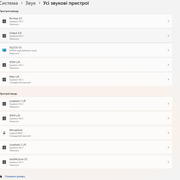
Потому что, каждый стерео выход определяется системой как отдельное устройство
Вот так:
-
Hotspur
Member

не фііо. треба шукатиZ440_User: ↑ 10.06.2026 21:11Щось я не бачив фііо яке може вивести по аналогу квадрофонію (фронт+тил, щоб в іграх монстри за спиною ричали, та в кіно хтось з-за спини на вухо шепотів).
-
Radio Bay
Member

- Откуда: Харків
Может проще два устройства, для звука и для записи?
-
DEVES
Member
- Откуда: Нова Зеляндія
Если не забуду, завтра достану из коробки Creative Sound Blaster AE-7 и гляну, что она из перечисленного умеет
-
vdemeshko
Member
- Откуда: Киев
разве в (MPC-HC, VLC) нельзя выбрать тип вывода аудио через WASAPI/ASIO плагины и декодеры, чтобы раскидать каналы 5.1 или 4.0 на физические разъемы карты? с https://vb-audio.com/Voicemeeter/banana.htm или https://vb-audio.com/Voicemeeter/potato.htm нельзя через ASIO замапить 4 канала на перед и тылы и в системе выбрать виртуальное аудиоустройство Voicemeeter как 4.0 систему ?DEVES: ↑ 10.06.2026 23:56 В играх и кино Audient ID14 MKII, впрочем как и любая другая не игровая карта, будет выводить только стерео.
Потому что, каждый стерео выход определяется системой как отдельное устройство
Вот так:
 было бы 4 канала куда выводить, а прикрутить можно ))) тоже блин проблема )))
- спойлер
 я пользовался когда то Virtual Cable их софтом ))
PS
буфер только пониже в ASIO поставить надо и частоту дискритезации повыше (аля 24/96 в для устройства) для минимальных задержек.. на совремном железе можно меньше 10 мск вполне получить
-
tablestikus
Member

- Откуда: Київ
Так це тобі AV-ресівер требаZ440_User: ↑ 10.06.2026 21:11Щось я не бачив фііо яке може вивести по аналогу квадрофонію (фронт+тил, щоб в іграх монстри за спиною ричали, та в кіно хтось з-за спини на вухо шепотів).Hotspur: ↑ 10.06.2026 19:32 все інше самий дорогий Фііо на скільки хватить грошей і не R2А як вона зможе справитися з квадрофонічним звуком? Чи не буде вона вивалювати фронтальне стерео мені на фронт і тил з ігор та кіно?vdemeshko: ↑ 10.06.2026 19:33 Audient ID14 MKII
Колись мав справу з Terratec Producer та Focusrite. Ігри та кіно не бачили куди багатоканал відправляти. Ото хіба що відеоплєра вдалося вмовити що оцей стереовихід на пульту це фронт, а оцей стереовихід це тил. Ігоря так і не вмовив видати мені квадро звук. Максимум - стерео в 4 канали гнав.
-
Z440_User
Member

- Откуда: Кривий Ріг
Як раз цього я в не хочу. Ото хіба що з AV-ресивера по line-out забирати аналог на аналогове своє підсилення.tablestikus: ↑ 11.06.2026 07:52 Так це тобі AV-ресівер треба

В мене вже наявне підсилення, яке комутує та працює з купою аналогових істочників і комп серед них це просто ще один додатковий пристрій якому виділено входи на підсилювачах (фронтальному та тиловому).
vdemeshko, в 2010-2015 у мене були проф.карти, називав вище, тоді ігри бачили купу стерео пристроїв в системі і питали куди виводити звук.
З Terratec Producer 88 система показувала що в тебе, умовно кажучи 10 стерео аудіокарт на вивід звуку з компа і обирай на яку з них виводити звук (звісно що стерео). Частіше за все звук ігри виводили на перший стерео-пристрій який знайшли в системі. А ще більше ігор взагалі не працювали з ASIO і не видавали звук взагалі.
Була софтина virtual cable, за допомогою неї вдалося вмовити відеоплєра вивести квадрофонічний звук, але з іграми максимально отримав лише стерео в чотири канали (фронт копіювався в тил). Focusrite таке дала, з Terratec нічого не вийшло.
Але то було давно, може сьогодні ситуація сильно змінилася і з'явився софт який клеїть розрізнені двоканальні аудіопристрої виводу в віртуальний багатоканальний пристрій. Та ігри навчилися працювати з ASIO драйверами, чи він10-11 навчилася wdm (чи як там його) відправляти в asio.
В Linux трошки простіше, якщо драйвер для залізяки є - налаштування то вже таке.
Драйвер X-FI в Linux дає прямий доступ до апаратного мікшера в DSP і відображає 4 двоканальні пристрої виводу + віртуальні "склейки" цих пристроїв в багатоканальні конфігурації силами DSP, тому у мене і використовується низькорівневий доступ з чистою ALSA без всяких прошарків pipewire, бо всі мікшування виконує DSP карти. Для кіно я створив власну "склейку" яка забирає з відеоплеєра 8 каналів, мікшує в DSP згідно моїх рівнів гучності ці 8 каналів в 4канали і відправляє на вхід "квадрофонічний склейки" DSP, яка виводить звук "as is".
Ігри мою напівапаратну "склейку" не бачать, тож виводять звук через зашиту апаратну квадрофонічну "склейку".
Аудіо-плеєри в Linux у мене виводять звук на апаратний пристрій "front out" з керуванням гучністю відповідним фейдером в апаратному мікшері карти.
-
vdemeshko
Member
- Откуда: Киев
Z440_User
virtual cable это софт той же компании что и тот виртуальный микшер - там можно замапить асио каналы в одно виртуальное аудио устройство с нужным числом каналов (4.0 , 5.0 , 5.1 И так далее)
Отправлено спустя 5 минут 26 секунд:
Были бы каналы что мапить можно а так Аудиент один из топовых интерфейсов в своем бюджете (причем не за космические деньги). Но есть один нюанс с этой моделью - там нет инсерта и входы идут через преампы. В целом они крайне мало шумные но… если нужно чистый вход на ADC, минуя преампы то нужно более старшую брать в серии iD24 или что то такое - бонусом там не плохой усиленый выход на наушники в сравнении с рядом других аудио интерфейсов он реально усиленный
virtual cable это софт той же компании что и тот виртуальный микшер - там можно замапить асио каналы в одно виртуальное аудио устройство с нужным числом каналов (4.0 , 5.0 , 5.1 И так далее)
Отправлено спустя 5 минут 26 секунд:
Были бы каналы что мапить можно
а так Аудиент один из топовых интерфейсов в своем бюджете (причем не за космические деньги). Но есть один нюанс с этой моделью - там нет инсерта и входы идут через преампы. В целом они крайне мало шумные но… если нужно чистый вход на ADC, минуя преампы то нужно более старшую брать в серии iD24 или что то такое - бонусом там не плохой усиленый выход на наушники в сравнении с рядом других аудио интерфейсов он реально усиленный -
MSiAventador
Member

- Откуда: Гонолула на Дніпрі
Уважуха року! Красень.konb999: ↑ 10.06.2026 22:54 Прикиньте сегодня написал в поддержку ibasso, поругался на них, что на сайте ibasso dx270r2r нет драйвера с поддержкой asio, для работы в режиме usb dac. Через час пришло письмо где извинились, сказали что благодарны мне за то что напомнил и выложили драйвер. Вот это у них там шарага... пол года назад вышло устройство за $1200 а они просто забыли выложить драйвер... и никто не напомнил... жесть

-
Radio Bay
Member
- Откуда: Харків
Ну, так і робится. Front L/R line-out на свій існуючий аналог, а тилові колонки годувати з підсилених каналів.Z440_User: ↑ 11.06.2026 09:24Ото хіба що з AV-ресивера по line-out забирати аналог на аналогове своє підсилення
Ресівер сам на апаратному рівні зміксує, що забажаєш. Може, потім і сабіка забажається. Я з цікавістю спостерігаю за пропонуємими рішеннями, але на мене дичина якась, хоча дуже цікаво
Последний раз редактировалось Radio Bay 11.06.2026 15:12, всего редактировалось 2 раза.
-
MSiAventador
Member
- Откуда: Гонолула на Дніпрі
Z440_User
Купи б/в ресивер , зупини тортури.
Купи б/в ресивер , зупини тортури.
-
Radio Bay
Member
- Откуда: Харків
З ASIO працюють програми через драйвер девайсу. ASIO4ALL — таке собі, нічого цікавого для себе не наколупав. За замовчуванням Вінда працює через Direct soundZ440_User: ↑ 11.06.2026 09:24Та ігри навчилися працювати з ASIO драйверами, чи він10-11 навчилася wdm (чи як там його) відправляти в asio
-
Z440_User
Member
- Откуда: Кривий Ріг
Мені потрібен звичайний "Line in" щоб можна було щось оцифрувати за потреби"vdemeshko: ↑ 11.06.2026 10:49 если нужно чистый вход на ADC, минуя преампы то нужно более старшую брать в серии iD24 или что то такое
Навушники мене не цікавлять, я ними майже не користуюся. Не рахуючи зв'язку смартфон+навушник (по черзі то в ліве то в праве вухо бубонить подкаст з ютубу) на вулиці, вдома в цьому році ще жодного разу не користувався навушниками.vdemeshko: ↑ 11.06.2026 10:49 бонусом там не плохой усиленый выход на наушники в сравнении с рядом других аудио интерфейсов он реально усиленный

Radio Bay: ↑ 11.06.2026 15:04 Ну, так і робится. Front L/R line-out на свій існуючий аналог, а тилові колонки годувати з підсилених каналів.
Фронтальна зв'язка "preamp+poweramp+підлогові гроби" приймає наступні звукові істочники на входи свого preamp'а:MSiAventador: ↑ 11.06.2026 15:09 Купи б/в ресивер , зупини тортури.
- касетна дека "tape-1"
- бобінник "tape-2"
- вініловий програвач "phono-1"
- вініловий програвач "phono-2" із змінними характеристиками навантаження картриджа
- front від компа на "line in"
- Bluetooth приймач висить на вході "tuner" і до нього іноді чіпляємось телефонами як до гарнітури. валялася платка без діла, знайшов їй заняття
Оце все preamp комутує одне з одним і дозволяє писати з чого завгодно на що завгодно (що може писати):
- Rec на вхід касетної деки Rec (спеціальний вхід для запису по струму)
- Rec Tape-1 на line in звукової карти
- Rec Tape-2 на вхід бобіника.
Тепер оце все що вище перелічено, треба підключити до AV- ресивера. Тобто він повинен мати такий самий набір входів-виходів.
Ну це якщо міняти фронтальний preamp+poweramp на ресивера.
Ресиверу доведеться качати та контролювати Fisher STE-1150.
Тил у мене просто береться з rear out звукової карти на line in тилового підсилювача і той грає на тилові АС.
-
QFlash
Member
- Откуда: Lviv
Вітання.
Тут трохи покопався, виявляється якщо в preamp висять електронні регулятори - воно собака задає "окраску" звуку навіть при скручених тембрах в 0.
Електроніка тембра - також опери.
Оскільки черех них проходить корисний сигнал.
Тому в ті часи шукали і підбирали опери в хороших звукових карточках.
Наразі карточок хороших немає, або вони застарілі. (мається на увазі внутрішні).
Не спорю зовнішніх багато і якісних (дорого правда).
MA8950 є предвак тому звучить шикарно.
МХ50SE без предвака, поки що.
Якось.
PS/ Предвак Ромашки на застарілій електроніці тому шумний. Але на малих потужностях - то саме що Mcintosh.
Звукові карточки досягли максимуму, навіть інтегровані, не бачу сенсу ганятись за THD/
Відправлено через 34 хвилини 7 секунд:
Тут трохи покопався, виявляється якщо в preamp висять електронні регулятори - воно собака задає "окраску" звуку навіть при скручених тембрах в 0.
Електроніка тембра - також опери.
Оскільки черех них проходить корисний сигнал.
Тому в ті часи шукали і підбирали опери в хороших звукових карточках.
Наразі карточок хороших немає, або вони застарілі. (мається на увазі внутрішні).
Не спорю зовнішніх багато і якісних (дорого правда).
MA8950 є предвак тому звучить шикарно.
МХ50SE без предвака, поки що.
Якось.
PS/ Предвак Ромашки на застарілій
 електроніці тому шумний. Але на малих потужностях - то саме що Mcintosh.
Звукові карточки досягли максимуму, навіть інтегровані, не бачу сенсу ганятись за THD/
Відправлено через 34 хвилини 7 секунд:
Хоча можна подивитись структуру опера чи електронного регулятора і скласти схему в симуляторі, але то дурного робота. Краще poweramp скласти.QFlash: ↑ 13.06.2026 12:40Звукові карточки досягли максимуму, навіть інтегровані, не бачу сенсу ганятись за THD/
-
Radio Bay
Member
- Откуда: Харків
В мене у знайомого твікнута Дакмастером Asus Xonar Essence STX, перероблене живлення і т.д. — це зовсім інший клас. Ще туди можна пару Бурсовів поставити — буде круто, але по ціні вона золота вийде. При сьогоднішній ціні та перевагах зовнішок внутрішні карти загубили сенс, тому ми і не бачимо нових моделей від виробниківQFlash: ↑ 13.06.2026 13:14Звукові карточки досягли максимуму
-
Z440_User
Member
- Откуда: Кривий Ріг
Radio Bay, є стара нова аудюга, оно викотили нещодавно 
Відправлено через 7 хвилин 22 секунди:
А, і AE-X
Відправлено через 7 хвилин 22 секунди:
А, і AE-X